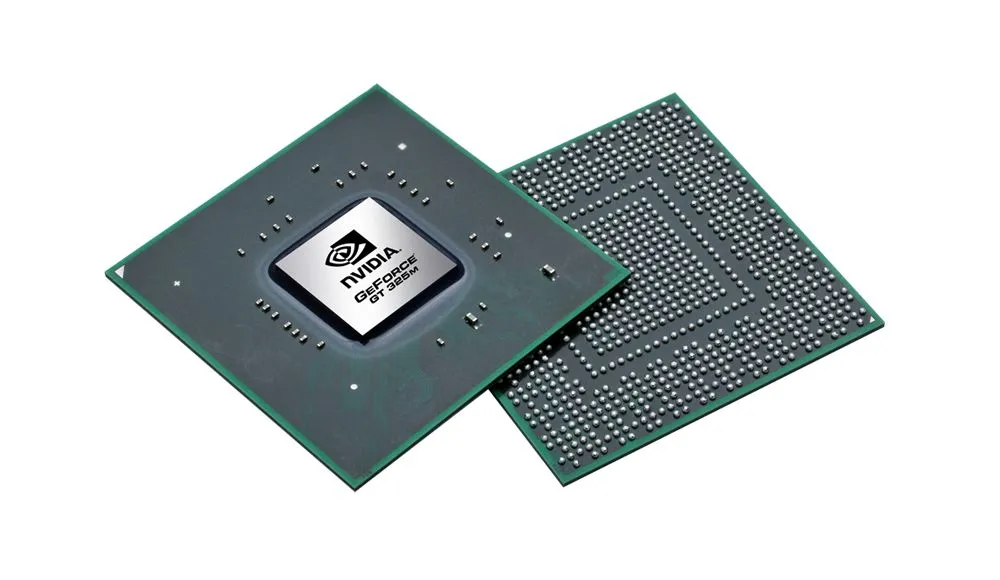
What Is a GPU? Understanding Graphics Processing and Why It Matters
When you look at a computer's specifications, you may see terms such as:
Integrated graphics
Dedicated GPU
NVIDIA GeForce
AMD Radeon
Graphics processor
But what exactly is a GPU?
And why does it matter so much for gaming, creative work and other demanding applications?
GPU stands for Graphics Processing Unit.
Although GPUs were originally developed primarily to handle graphics, modern GPUs can do much more. Their ability to perform many calculations in parallel makes them useful for gaming, video processing, 3D rendering, scientific computing, artificial intelligence and other workloads.
To understand why, it helps to start with the basics.
What is a GPU?
A GPU is a processor designed to perform certain types of calculations extremely efficiently, particularly workloads that can be broken into many operations that can happen simultaneously.
Graphics rendering is a perfect example.
When a computer displays a complex 3D scene, there can be enormous numbers of calculations involved in determining:
Shapes
Lighting
Textures
Shadows
Colors
Reflections
Movement
Visual effects
A GPU is designed to process many of these operations in parallel.
This makes it fundamentally different from the general-purpose role of a CPU.
GPU vs CPU: What's the difference?
The CPU and GPU are both processors, but they are designed around different strengths.
CPU
A CPU is a general-purpose processor.
It handles a broad range of instructions and tasks, including:
Operating system operations
Application logic
General calculations
System management
Running software
Coordinating different processes
Modern CPUs typically have a relatively small number of powerful cores compared with the enormous number of processing units found in many GPUs.
GPU
A GPU is designed around highly parallel workloads.
It can perform large numbers of similar calculations simultaneously, making it particularly effective for:
Graphics rendering
Gaming
3D workloads
Certain video processing tasks
Scientific computing
Machine learning
Other parallel workloads
Neither component replaces the other.
They work together.
Why does gaming need a GPU?
Modern games can create extremely complex visual environments.
Every frame can involve calculations for:
Geometry
Textures
Lighting
Shadows
Reflections
Particles
Post-processing effects
The GPU processes much of the graphics workload required to turn those calculations into the images displayed on your screen.
This is why the GPU is one of the most important components in a gaming computer.
However, gaming performance doesn't depend on the GPU alone.
The CPU, RAM, storage, cooling, game engine, resolution and graphics settings can all influence the final experience.
What does GPU performance mean?
GPU specifications can be complicated.
You may encounter terms such as:
VRAM
CUDA cores
Stream processors
Compute units
Ray tracing cores
Tensor cores
Clock speed
Memory bandwidth
Different manufacturers and architectures use different terminology, so simply comparing one number across different GPU families can be misleading.
The best way to understand GPU performance is to consider the specific GPU architecture, its capabilities and how it performs in the workloads that matter to you.
What is VRAM?
VRAM stands for Video Random Access Memory.
It is memory dedicated primarily to graphics-related workloads.
A GPU can use VRAM to store information such as:
Textures
Frame buffers
Graphics data
3D assets
Other information needed during rendering
You may see graphics cards advertised with:
4GB VRAM
8GB VRAM
12GB VRAM
16GB VRAM
More VRAM can be useful for demanding graphics workloads, particularly when working with high-resolution textures, large 3D scenes or high-resolution displays.
But just like system RAM, more isn't automatically better for every workload.
The GPU's processing capabilities, memory bandwidth, architecture and software support also matter.
Integrated vs dedicated graphics
One of the most important GPU distinctions is whether the graphics hardware is integrated or dedicated.
Integrated graphics
Integrated graphics are built into the processor or share system resources within the same platform.
They are commonly found in laptops, compact computers and everyday devices.
Integrated graphics can be suitable for:
Web browsing
Office applications
Streaming
General productivity
Light creative work
Some gaming
Modern integrated graphics can be surprisingly capable for their size and power requirements.
They also generally consume less power than many dedicated graphics solutions.
What is a dedicated GPU?
A dedicated GPU is a separate graphics processor with its own graphics memory and hardware resources.
Dedicated graphics solutions are commonly found in:
Gaming laptops
Gaming desktops
Workstations
High-performance computers
They can provide substantially more graphics processing capability than many integrated solutions.
This makes them particularly useful for:
Gaming
3D rendering
Professional graphics
Video production
Engineering applications
AI workloads
Other GPU-intensive tasks
However, dedicated GPUs can also consume more power and generate more heat.
That's why a computer designed around a powerful dedicated GPU generally needs a suitable cooling and power system.
What is ray tracing?
Ray tracing is a rendering technique designed to simulate how light interacts with objects in a virtual environment.
It can produce more realistic effects involving:
Reflections
Shadows
Lighting
Refraction
Modern GPUs can include specialized hardware designed to accelerate ray-tracing calculations.
Ray tracing can improve visual realism, but it can also increase the computational workload.
This means enabling advanced ray-tracing effects can affect gaming performance depending on the GPU, game and settings.
What is AI acceleration on a GPU?
Modern GPUs can also contain specialized hardware designed for AI and machine-learning workloads.
These capabilities can be used for tasks such as:
AI inference
Image processing
Upscaling
Generative workloads
Machine learning
Other matrix and parallel computations
This is one reason GPUs have become increasingly important beyond traditional gaming and graphics.
Their parallel architecture makes them useful for certain computational workloads that can be efficiently distributed across many processing units.
GPUs and video editing
Video editing can benefit from GPU acceleration.
Modern editing applications can use the GPU for tasks such as:
Effects
Color processing
Playback acceleration
Encoding and decoding
Rendering
Visual effects
The exact benefits depend on the software and the type of project.
A powerful GPU can be particularly useful for demanding workflows involving high-resolution footage, complex effects and advanced visual processing.
But the CPU, RAM and storage remain important too.
A strong GPU cannot compensate for every limitation elsewhere in the system.
GPUs and 3D work
3D applications can be highly demanding.
Creating and rendering complex scenes can involve:
Geometry
Lighting
Textures
Physics
Animation
Rendering
Many 3D applications can take advantage of GPU acceleration to process these workloads more efficiently.
For professionals working with 3D modeling, animation, visual effects or rendering, the GPU can therefore become one of the most important components in the system.
What about laptops?
Laptop GPUs require a particularly careful approach.
A laptop with a dedicated GPU doesn't necessarily perform identically to a desktop computer using a GPU with a similar name.
Laptop designs have limitations involving:
Power consumption
Heat
Cooling
Physical size
Battery life
Manufacturers therefore have to balance performance with the constraints of the laptop chassis.
This is another example of why simply reading a component's name doesn't always tell you the complete story.
The implementation matters.
Does a more expensive GPU always mean better?
Not necessarily.
A higher-end GPU can provide significantly more performance, but whether that matters depends on the workload.
Someone who primarily uses a computer for:
Web browsing
Documents
Email
Streaming
may have little need for an extremely powerful graphics processor.
Someone working with:
Modern games
3D rendering
Professional video
AI workloads
Engineering software
may benefit much more from additional GPU capability.
The right GPU is therefore the one that fits the workload.
How should you compare GPUs?
When comparing graphics hardware, consider:
1. GPU architecture
Different generations and architectures can have significantly different capabilities.
2. VRAM
How much graphics memory is available?
3. Memory bandwidth
How quickly can the GPU move data between its processing hardware and memory?
4. Processing capability
How powerful is the GPU in the workloads you actually care about?
5. Software support
Does your software make use of the GPU's capabilities?
6. Power and cooling
Can the device provide enough power and thermal capacity to maintain the GPU's performance?
7. Resolution and refresh rate
A GPU driving a high-resolution, high-refresh display may have a much heavier workload than one driving a basic display.
Again, the number on the specification sheet is only part of the story.
CPU, GPU, RAM and storage working together
A computer's performance comes from the interaction between its components.
The:
CPU handles general-purpose processing.
GPU handles graphics and other highly parallel workloads.
RAM provides temporary working memory.
Storage keeps the operating system, applications and files.
The display presents the final output.
Cooling and power systems allow the hardware to operate within its design limits.
Software determines how these components are used.
This is why building or choosing a computer isn't simply about finding the biggest number in every category.
The components need to work well together.
The GPU is more than gaming
It's easy to associate GPUs exclusively with gaming.
Gaming is certainly one of their most visible applications, but modern GPUs are much broader than that.
They are used in:
Video production
3D rendering
Engineering
Scientific research
Artificial intelligence
Machine learning
Image processing
Professional visualization
The common factor is the ability to process large numbers of calculations efficiently in parallel.
The bottom line
A GPU is a specialized processor designed to handle graphics and other workloads that benefit from parallel processing.
It plays an important role in gaming, creative applications, 3D work and many modern computing workloads.
But choosing a GPU isn't simply about selecting the largest VRAM number or the most expensive graphics card.
Consider:
What will you use it for?
What resolution will you work at?
What software will you run?
What other hardware does it work with?
Can the system provide the power and cooling it needs?
Once again, the complete system matters.
At iBudCares, we believe technology becomes easier to understand when you look beyond product names and specifications and understand what the components actually do.
Explore technology, products and the Buy • Swap • Care ecosystem at: